Migrating to nuxt
Inspired by my coworker and friend, I recently decided to upgrade my website with a blog. Until then, my website had just been a plain landing page with my name on it (as of 30.01.2026, you can still see this on my homepage). I wanted to keep the design, but the website was written in react. I haven't really touched react in years, and I'm more comfortable with vue these days. Additionally, I prefer to write blogs in markdown, so I'd want to install a markdown parser as well.
Since the site was so simple, it took me less than an hour to migrate it to vue. I just created a new orphan branch, installed vue, vite, etc., and did some search and replace to change className into class.
git show d012 --stat
commit d012c38afaf3e17133148094299190f0e9abc1f8 (origin/vue-rewrite, vue-rewrite, vue-backup)
Author: TonyStr <hello@tonystr.net>
Date:   Mon Jan 19 12:47:51 2026 +0100

    BREAKING!: rewrite app to vue

 .github/workflows/node.js.yml |   58 +
 .gitignore                    |   36 +
 .vscode/extensions.json       |    3 +
 README.md                     |   38 +
 index.html                    |   14 +
 jsconfig.json                 |    8 +
 package-lock.json             | 2971 +++++++++++++++++++++++++++++++++++++++++++
 package.json                  |   23 +
 public/favicon.ico            |  Bin 0 -> 4286 bytes
 src/App.vue                   |   10 +
 src/IconPlanetDash.vue        |    9 +
 src/PlanetPage.vue            |  176 +++
 src/index.css                 |   54 +
 src/main.js                   |    4 +
 src/planet-dash.svg           |    7 +
 vite.config.js                |   18 +
 16 files changed, 3429 insertions(+)
Then, thinking I'd keep this project simple and low-effort, I went and added vue-markdown-render, which wraps markdown-it. This allows me to render markdown client-side, and keep my website as a simple vue SPA. It did feel a bit wrong to serve a javascript-based SPA for such a simple website, which could really be just a collection of html files served on GitHub pages. But I was committed to using vue, as I might want to add more features later. It annoyed me a little bit that I was fetching the markdown file for a blog post before rendering it, causing the user to see loading... for a split second before the post renders. So I set up a Pinia store, and made my site prefetch the markdown file for a blog post once you hover over the link to it. This at least fixed the loading issue when you're navigating from tonystr.net/blog, but visitors who directly enter an article would still see the loading message.
My previous website (before I decided to rewrite it, and left only an empty landing page in its place) had a markdown-based blog with lots of added features for rendering custom react components, videos, etc. Still, I wanted to revive some of those blog posts, and render them in my new website. It was mostly just markdown after all. I copied over the regex article, and immediately realised that I'd like to have syntax highlighting for code blocks. I added markdown-it-highlight, imported an OK syntax theme, and I was happy. After that, I only had to manipulate the DOM output to load images and videos.
I was able to recover all of my old blog posts, but had to remove some custom react components and special features. My old blog even had the ability to execute javascript examples, which I abused to fake gamemaker examples. I left the actual content of the old posts unchanged, so some of them are telling you to click on non-existent buttons, or interact with non-existent demos. The autotiling post suffers especially hard from this, as it relied heavily on a custom react component which allowed the user to paint a map with tiles, which were automatically autotiled in the browser.
After creating an RSS feed and styling the blog how I wanted it, I wrote my first new blog post "On git show". I was happy with my site, and a week later I wrote another post "I made my own git".
This one got a lot of attention on Hacker News, so I quickly went and installed @vercel/analytics.
# Vercel
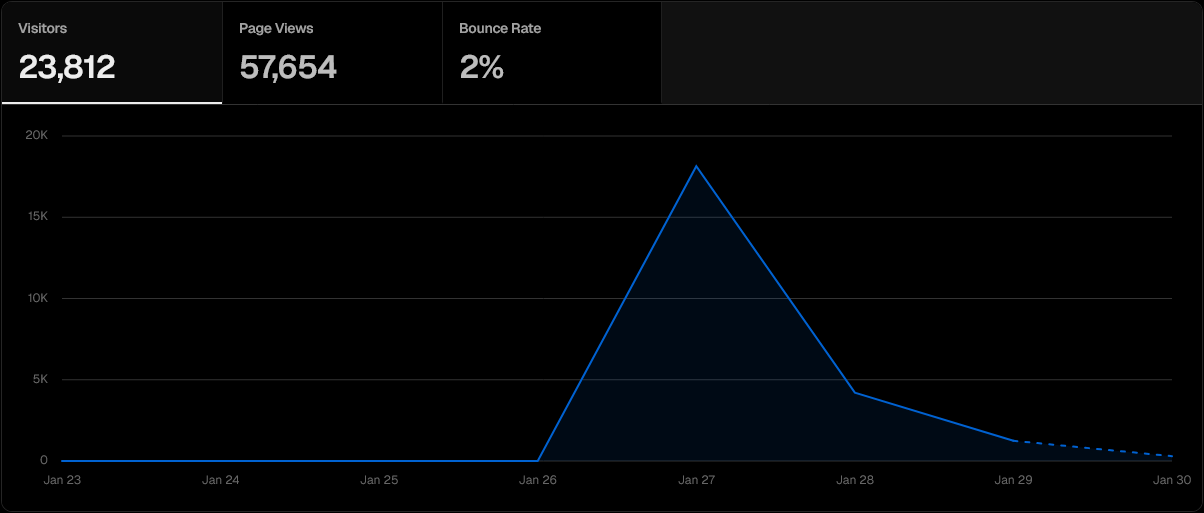
Wow! 20000 visitors viewed my blog. It was very interesting to see how many clicks my post got, and if anyone were viewing my other posts. I don't have any way to see if anyone followed my rss feed, but I got some interesting insights like which countries visitors were viewing from, and what browsers and devices people were using. This is a technical blog, for technical people, and I posted it on a technical forum, so I was quite surprised to see such a low percentage of firefox users.
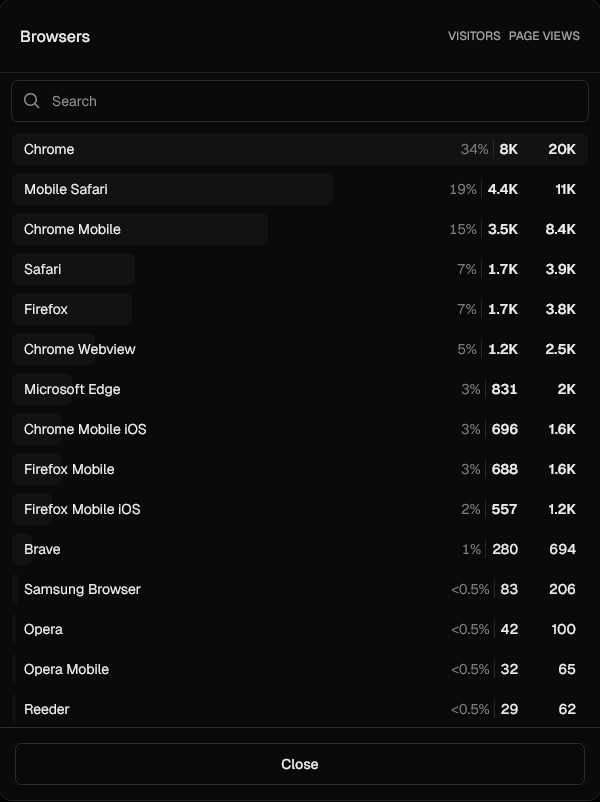
I didn't test my website on any other browser than firefox, so I'm relieved it didn't break for anyone. Anyway, it was also interesting to see the referrers; which website visitors came from. I only posted my article on Hacker News, but being a technical forum (with a very simple front end), there are many users who have created their own mirrors with different styling: hckrnews.com, news.hada.io, app.usepanda.com, etc. There were also some users who came from content aggregators, such as brutalist.report or inoreader.com.
Reading through this list, I also saw lobste.rs. Someone had reposted my post there, but it received much less attention than on Hacker News.
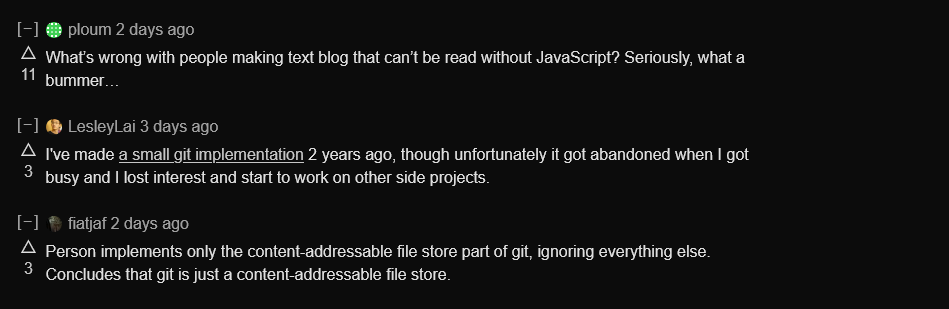
fiatjaf wasn't too impressed with the content, and ploum wasn't impressed with the form. fiatjaf's comment didn't bother me, as the git project was just a small side project to learn more about git internals. I think most readers understood that and didn't expect a complete rival to git. ploum's comment however, I empathise with. I hate slow software, and I don't like how reliant we've become on over-engineered solutions to simple problems, like hosting a blog. Unfortunately, writing a website in pure html/css sucks — you can't reuse components, and styles cascade and ruin other parts of your design. Vue feels much better to write, and it doesn't have to be just a client-side SPA.
# Nuxt
I've used Nuxt before, on a much larger website, so I knew it wasn't hard to migrate a vue project to it. With Nuxt, you can write vue SFCs, and have them render on the server. This is even better than PHP, because Nuxt uses hydration. On an incoming request, the server first renders the page locally, then sends the pre-rendered html/css to the client, then it sends the rest of the vue project as JS bundles to the client. The client gets a finished website, but it lacks interactivity (onclick handlers, scroll events, etc.). The javascript attaches handlers to the elements in the DOM, and you get a website that feels the same as a normal SPA, but pre-rendered. After this initial load, visiting other pages on the site should be quicker, because now it uses javascript (vue) to update the DOM, instead of fetching new html documents each time you click on a blog post.
Nuxt also automatically handles prefetching, so while JS bundles for individual pages are fetched form the server on page visit, hovering over a link will fetch those before you click on it. This takes care of the prefetching that I did manually in my previous version.
Unfortunately, serving my markdown files in public/ and just rendering them in pages/[...slug].vue wouldn't cut it. I want the markdown files to be served as pages, not to be fetched by the client after entering a generic page. This would be as inefficient as my previous solution.
# Nuxt Content
I decided to use @nuxt/content to render my markdown posts. Despite having used Nuxt Content in the past, I actually had a lot of trouble with setting this up. They had rewritten the whole project, and it was now based on SQL. This does mean that you can use some SQL features, but I would have preferred saving the headache.
const { data: articles } = await useAsyncData(
    'blog_index',
    () => queryCollection('blog')
        // Exclude articles starting with underscore
        .where('path', 'NOT LIKE', '/blog/%/_%')
        .order('date', 'DESC')
        .all(),
);
I had an issue where the blog index and the blog articles would render fine locally, but after deploying, I realised that production only showed empty pages. If you first visited a different page and then navigated to the blog index or to an article, it would load fine, but anyone visiting from an external site would be met with an empty page. There were no error logs reporting this, so I spent a lot of time reading documentation and old GitHub issues, before I found a solution.
export default defineNuxtConfig({
    content: {
        // This is needed for hosting on vercel!!!
        experimental: { sqliteConnector: 'native' },
    }
});
It feels good to finally have a good codebase for my website. Content uses Shiki for syntax highlighting which looks way better than highlight.js which I used before, and it has better color themes (I'm a big fan of kanagawa-wave which I use in this blog).
This is probably not what ploum would have wanted, as I'm now using even more javascript to render this simple website, but ultimately less work is done on the client, page loads are faster, and it's now possible to browse my site without javascript. It's also easier for me, as I don't have to manually maintain an articles.json file with blog post metadata. I also made the rss.xml file generate automatically. Now, all I need to do to write and publish a new blog post is to write the blog post. I prefix the post with an underscore until it's ready, and it'll be published once I commit a version without an underscore.