/Reg(ul[ae]r)?[\s_-]*Ex(pres{2}ions?|p)?/i
The mess of a title you see above isn't as messy as it might first seem. Despite it's seemingly irregular patterns that clutter what might otherwise look like a word, that string of symbols is called a Regular Expression. Let's start by looking at a much simpler regex, /hello/. If you were to test this regex against this string "hello world", you would match "hello".
// Regex example in JavaScript

const string = 'Three hundred flies flew over the fried rice.';

const match = string.match(/flies/);    // Search for "flies" with regex
const index = string.indexOf('flies');  // Search for "flies" with <String>.indexOf()

if (match !== null) console.log('String contains "flies"!');
if (index !== -1  ) console.log('String contains "flies"!');
In the above example, regex is used to check if a string contains the word "flies". Since the string does contain that word, it will "match" the word, and return something that is not null. If it fails to match (the string doesn't contain "flies"), it will return null. Below the line that tries to match a regex, is a line that does the same with <String>.indexOf(). That function returns the position (index) of the first occurrence of a substring in a different string. If it doesn't find any occurrence of that substring, it will return -1 instead. This function is faster than <String>.match(), because the match function is capable of a lot more.
# Match Output
Different regex implementations may have different forms of output. Some software that lets you search with regex, will usually just highlight the matching sequences, and/or let you jump to them. In JavaScript, the <String>.match() function returns an array, but it has some extra properties added. The 0 index of the array holds the matched substring, which in the case of the example above is just 'flies'. The array also has a <Match>.index variable which holds the position of the match, same way <String>.indexOf() works. Lastly, it has a <Match>.input variable which holds the input string. In the case of the example above, that would be 'Three hundred flies flew over the fried rice.'. With the way we've used the match function so far, it will only ever have one index, making it a pretty weird array, however we'll see why it is an array later.
# Alternative Matches
Say you're searching through the entirety of the e-book, The Witcher: Sword of Destiny, and you want to figure out exactly how many times the word "diverge" is mentioned. Just searching for the word "diverge" won't do. What about when he writes "diverging" or "diverged"? You'd have to search multiple times with different strings. Here is where /regex/ and normal "strings" differ. Strings consist of characters ("a", "b", "x", "_", "9", ".", etc.), but regular expressions consist of tokens. Many of these tokens simply represent a character, /a/ = "a", /b/ = "b", /x/ = "x", /_/ = "_", /9/ = "9", however some tokens represent different patterns. /./ for example, represents "any character". If you were to match something against /./, any character of any string would match it. The only case where string.match(/./) returns null is if string is empty (""). This is why it's called matching instead of something like searching - you're trying to match patterns. If you want to match a character which already has a use, like /./, you can escape it with a backslash (\). /\./ matches ".".
const string = 'The diverging path diverged between the ' +
               'divergent forest and the divine swamp.';

console.log(string.match(/diverge|diverging|divergent|divine|divorce/));
Using the pipe (|) symbol token, you can search for an occurrence of something or something else or something else and so on. All in all, this regex matches diverging, diverged, divergent and divine. It does not match divorce, since that isn't in the input string. One problem with this is that even though it is able to match multiple words, and even through the match function returns an array, it will only ever match the first diverging, and then stop parsing the string. Once it has matched one thing, it's satisfied. To match all occurrences in the string, you could use the g flag (short for "global") on the regex.
const string = 'The diverging path diverged between the ' +
               'divergent forest and the divine swamp.';

console.log(string.match(/diverge|diverging|divergent|divine|divorce/g));
This makes the regex search the whole string, and not stop after it has found a match. It also changes the output to be an array of each matched word, but it looses the variables <Match>.input and <Match>.index.
# Grouping Characters
The regex we have above is really just a list of words it tries to match. We can make the list shorter, and the regex faster by using capturing groups. A capturing group is defined simply by wrapping some characters in (parentheses).
const regex = /div(erge|erging|ergent|ine|orce)/g;
Here we removed 'div' from each word, and moved it outside a capturing group. The "or" pipes are only scoped to their capturing group. This regex matches the same as the previous regex, but it's faster and more compact. It can be made even faster and more compact by using more character groups. You can also use the non-capturing character group by placing ?: after the opening parenthesis.
const regex = /div(?:erg(?:ent|e|ing)|ine|orce)/g;
Here we did the same as before, but with erg from "ergent", "erging" and "erge", and turned the capturing groups into non-capturing groups. The non-capturing groups are a bit faster than normal capturing groups, simply because they don't actually capture any values. Note that regex want's to be done matching as soon as possible, which means if it tries matching the word "divergent" but your regex says /diverge|divergent/, it'll only match diverge and call it a day. To avoid this, and assure you match everything you need, swap the orders so that the longer versions of similar patterns come first. /divergent|diverge/.
Finally, what does the capturing group really do? It allows you to see what substring was matched with your regex (as long as you don't use the g flag). Each capturing group will output it's value into the array. The first matched character group will occupy the 1 index, the 2nd the 2 index, and so on. The non-capturing groups do not output anything, and instead only serve to scope parts of a regex. The capturing groups are numbered from left to right. To figure out which number a capturing group has, you can simply count all opening parentheses, except the non-capturing groups, from the start to end.
const string = 'The diverging path diverged between the ' +
               'divergent forest and the divine swamp.';

// Will stop at first match, "diverging"
console.log(string.match(/(di)v(erg(ent|e|ing)|ine|orce)/));
# Repetition
Repetition is a near fundamental useful concept within regex. You have the ability to repeat characters, tokens, and even whole patterns (enclosed in capturing groups) with regex.
const string = 'Hello!!!!!!! World!!!!';

console.log(string.match(/!+/g)); // Match one or more characters
console.log(string.match(/!*/g)); // Match any amount of characters, or none at all
console.log(string.match(/!{2,5}/g)); // Match anywhere between 2 and 5 characters
+ matches the token on the left as many times as it can, but if it doesn't match at least once, it fails. * works the same way, except it can also match zero times. Since the regex /!*/g only needs to match exclamation marks or nothing, it will succeed in matching nothing, which leads to the output being ['', '', '', '', '', '!!!!!!!', '', '', '', '', '', '', '!!!!', '']. That's one empty string for every character in the input string (that isn't "!"), plus another at the end. /!+/g Outputs the exact same, but without all the empty strings. Lastly, you can use {n,m} to match anywhere between n and m amount of repetitions of a character. In the above example the first five "!"s are matched, then the next two "!"s are matched, and lastly the four remaining "!"s match. {n} can also be used to match exactly n occurrences of a character. Say you wanted to find out whether or not someone in a chatroom used too many symbols at the end of a sentence......................
const strings = [
    'person 1 - Hello!!!!!!!!!!!!!!!!!!1!!11',
    'person 2 - Hi',
    'person 3 - What do you want?',
    'person 1 - What do YOU want??????????????????????????',
    'person 3 - ...',
    'person 2 - .....',
    'person 1 - .......................',
    'person 2 - .?.?.?.?.?.?.?.?.?.!!?!!!',
    'person 1 - ......!!!!?????????!!!!......'
];

for (const string of strings) {
    if (string.match(/(?:!|\.|\?|1){6}(?:!|\.|\?|1)*/)) {
        console.log('Detected annoying message: ' + string);
    }
}
The regex starts with a non-capturing group (?:, which matches either "!", ".", "?" or "1". "." and "?" are escaped since they're special tokens in regex. Once the non-capturing group has matched something, it tries to match again, and again, and again until it has matched six times. Next, an identical non-capturing group tries to match any of the same characters as previous, any mount of times. This essentially means the regex matches "!", ".", "?" or "1" repeated either six or more times. Although this is nice, what if you only wanted to match repeated characters that are the same? like "???????????", "!!!!!!!!!!!!!" or ".................", but not "!?..?!?!?!?!..1.1.1.1.". If you use capturing groups regex allows you to try to match the content of something that was previously matched. You can refer to capturing groups in a regex simply by escaping a number. \1 refers to the first capturing group in the regex, \2 refers to the second, \3 refers to the third, and so on. Since we have two identical sections in our regex, we can turn the first into a capturing group, then repeat a reference to the first capturing group exactly five times (since we've already matched it once with the capture group), and finally match the reference any amount of times with the star.
const regex = /(!|\.|\?|1)\1{6}\1*/;
# Character Class
Regex has even more features that help optimize and make this even more compact. A group of single characters (like we have above), can be written as a character class, by using square brackets.
const regex = /[!\.\?1]\1{6}\1*/;
Since a character class can only house individual characters, there is no need for the | token. Instead the characters are all written right next to each other. However, most tokens still need to be escaped, since a character class can also house tokens. [.+{2}] is a perfectly valid character group, that will match either "any character", "+", "{", "2" or "}". The tokens that normally have a use like "+" and "{", don't need to be escaped, since they can't do anything in the character class. Remember that the character class can only match individual characters, so repeating characters doesn't make any sense, thus those would-be tokens are treated as normal characters. That example is however a bit useless since the . token means "any character", which means that no matter what the character class will match some character, so the other characters in it aren't really needed - and if you don't need more than one character, you don't need a character class at all.
Character classes do have some special features in addition to being a quicker way of writing single-character-groups. They can match ranges of characters.
const string = 'Hi, I am 17 years old';

console.log(string.match(/[0-9]+/));
The regex above matches any character between 1 and 9, repeated one or more times. I say character and not number, because [x-y] is read as any character from x to y according to the order of the character codes. The best way to understand this is to look at an ASCII table.
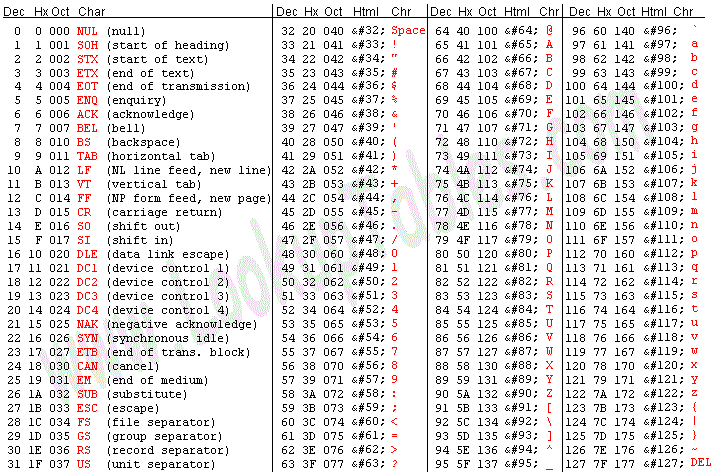
"Dec" is short for "Decimal". The decimal columns represent the charcode of each character. "Char" is short for "Character". The regex /[0-9]/ matches any character from character "0" to character "9", sequentially by the ascii table above. The regex /[1-_]/ matches any character from "1" (charcode: 49) to "_" (charcode: 95). Between "1" and "_" are some all the numbers except 0, some symbols and all CAPITAL letters, but no lowercase letters.
const string = 'Hi, I am 17 years old. :)';

console.log(string.match(/[1-_]+/g));
Another use of character classes is negation. You can check for the opposite of a character by placing an ^ in the beginning of your character class.
const string = 'Hello World!!1!';

console.log(string.match(/[^a-z0-9]+/g));
The character class above finds any character that is not within the range a-z, and is not within the range 0-9. That means it'll match anything that isn't either a lowercase letter or a number. Note that if you want to actually match the character "^", you can either escape it or simply not put it in the beginning of the character class.
# Shorthand Character Classes
While character classes are great, it could be a bit cumbersome to have to write the same classes over and over again, which is why a lot of regex flavors provide shorthand character classes. These are character classes that are already made for you. The tokens for these character classes look like escaped letters. (Remember that + just repeats the previous token one or more times)
const string = `
    Hello.
    Did you know that JavaScript supports
    multi-line strings by using template_litterals?
    \`this is a template litteral\`
    You can even evaluate JavaScript in them like this:
    4 + 8 = ${4 + 8}
    It is super useful!
    By the way, Norwegian has æ, ø and å characters.
    Japanese has symbols like 六
`;

console.log(string);

console.log('Digits:',          string.match(/\d+/g));
console.log('Word Characters:', string.match(/\w+/g));
console.log('Whitespace:',      string.match(/\s+/g));
\d matches any digit, same as [0-9]. \w matches any word character. In most regex flavors this means [a-zA-Z_0-9]. Notice that it includes the underscore ("_"), and numbers 0-9. It doesn't match any unicode nor ANSII characters, so "æ", "ø", "å" and "六" are left in the dust. \s matches any whitespace, which is any "invisible" character, like space, newline, tab, etc. This one also includes a number of unicode whitespace characters.
Shorthand character classes can be used in character classes too. [\d\s] would match either a digit or a whitespace. If you wanted to match numbers and the decimal point, you could use [\d\.]. This way you could also check for anything but a character class. [^\d] would find any character that is not a digit. Though most regex flavors also have character classes that represent the negation of another character class. \D is [^\d], \W is [^\w] and \S is [^\s].
const string = `
    Hello.
    Did you know that JavaScript supports
    multi-line strings by using template_litterals?
    \`this is a template litteral\`
    You can even evaluate JavaScript in them like this:
    4 + 8 = ${4 + 8}
    It is super useful!
    By the way, Norwegian has æ, ø and å characters.
    Japanese has symbols like 六
`;

console.log(string);

console.log('Anything but digits:',          string.match(/\D+/g));
console.log('Anything but word Characters:', string.match(/\W+/g));
console.log('Anything but whitespace:',      string.match(/\S+/g));
# When To Use Regex
As you've learned, regular expressions can be used to match complex patterns. It can be used to detect expected patterns in human language, it can be used to sanitize data and is near essential in general string manipulation once you get comfortable with it. A typical use of regex would be to check if an input string qualifies as an email, or a hex code, or a phone number. Although this tutorial only really covered the basics, you should already be able to use regex for all of that, and lots more! If you're interested in learning everything there is to learn about regex, check out https://www.regular-expressions.info/tutorial.html. There are many more interesting features of regex, such as lookahead/lookbehind, recursion and conditional matching. I can assure you a lot of regex was used to build this website. Have fun, and, be careful not to go too crazy.